# Delaying Layout Updates
# Frame Drops
Well, let's clarify what "frames per second" means. It refers to the number of times your screen is updated per second. Sixty frames per second is a common standard for web applications today. Each frame has a duration of 16.7 milliseconds, which means the browser should aim to complete the entire JavaScript execution, style calculations, layout, painting, and compositing process within that time. If the browser exceeds this time limit, it results in a frame drop. Ideally, the requestAnimationFrame function should be called approximately 60 times per second without any frame drops.
Frame drops can occur due to various reasons, including:
- Long-running JavaScript: If you have computationally intensive operations or complex calculations in your JavaScript code, it can cause delays and exceed the time allocated for a single frame. This can result in frame drops and affect the smoothness of animations or interactions.
- JavaScript triggering re-layout: Certain JavaScript operations, such as accessing properties like
getBoundingClientRect()or modifying the DOM structure, can trigger re-layouts. If these operations are performed frequently or on elements with complex layouts, it can cause delays and impact the frame rate. - Heavy DOM updates: If you have a large number of DOM elements or perform frequent updates to the DOM, it can introduce overhead and affect the rendering performance. This includes operations like adding, removing, or modifying elements, as well as applying styles or class changes.
In these cases, the main thread of the browser is blocked until the JavaScript execution or re-layout is completed, which can lead to frame drops and reduced overall performance.
When the user clicks on the button and you need to show the dropdown, the following sequence of events typically occurs:
- The "click" event is triggered on the button element.
- Angular's change detection mechanism detects the event and starts the change detection process.
- During the change detection process, Angular checks the component tree for any changes in the component's properties, bindings, or expressions.
- If there is an
ngIfdirective involved in the component tree, Angular evaluates its binding expression to determine whether the dropdown should be displayed or not. - If the binding expression in the
ngIfdirective evaluates totrue, Angular updates the DOM to include the dropdown element. This update involves manipulating the DOM nodes to add the dropdown element. - After updating the DOM, the browser computes the styles for the updated elements. This involves applying CSS rules, calculating element dimensions, and determining the position of the dropdown within the layout.
- Finally, the browser performs the layout update, where it positions the elements based on the computed styles and determines the visual representation of the dropdown on the screen.
It's important to note that this sequence of events happens quickly and is usually imperceptible to the user. However, in cases where there are complex DOM structures or heavy computations involved, there may be slight delays that can lead to frame drops or reduced performance. Optimizing your code and minimizing unnecessary operations can help ensure smoother rendering and better user experience.
The more DOM nodes there are on the page, the larger the layout tree becomes, and the longer it takes for the browser to perform the layout update. This is because the browser needs to iterate through a larger number of nodes and calculate their respective styles and positions. It's worth noting that modern browsers employ various optimization techniques, such as layout caching, to minimize the overhead of layout updates. The browser tries to avoid unnecessary layout computations by reusing cached layout information whenever possible.
After the layout update is completed and the browser has computed the geometry of the elements, the next step is the rendering or rasterization process. During rasterization, the browser converts the layout information into a bitmap representation that can be drawn on the screen.
The rasterization process involves determining the color, opacity, and other visual attributes of each element based on their styles and position in the layout tree. The browser then takes this information and creates a bitmap image that represents the final rendered frame.
Once the rasterization is done, the browser needs to send the bitmap to the composition thread, which is responsible for compositing and displaying the final frame on the screen.
requestAnimationFrame is generally the preferred approach compared to alternatives like setTimeout or Promise.resolve().then(). The reason for this is that requestAnimationFrame is specifically designed to synchronize with the browser's rendering pipeline and provide smooth animations and layout updates. In contrast, setTimeout and Promise.resolve().then() are executed as soon as the JavaScript runtime is available, which may not necessarily align with the browser's rendering pipeline. The animation frame callback function is executed at the beginning of the next rendering frame. This means that the callback is invoked after the current frame has been rendered and displayed on the screen, allowing you to make layout changes or perform other rendering-related tasks without affecting the current frame's rendering process.
There's a great list What forces layout/reflow (opens new window).
For instance, the element.focus() method can trigger layout updates and potentially lead to frame drops, especially if it's called frequently or on elements that require significant layout computations. This is what Blink does internally:
void Element::focus(const FocusParams& params) {
  if (!isConnected())
    return;

  if (!GetDocument().IsFocusAllowed())
    return;

  if (GetDocument().FocusedElement() == this)
    return;

  if (!GetDocument().IsActive())
    return;

  GetDocument().UpdateStyleAndLayoutTreeForNode(this); // 👈👈
}
The UpdateStyleAndLayoutTreeForNode then calls the UpdateStyleAndLayoutTreeForThisDocument which does the following:
- Recalculating slot assignments: in the context of the Shadow DOM, slots are used to distribute child elements to specific insertion points within a shadow tree. When the styles or content of a shadow tree change, the browser may need to recalculate slot assignments to ensure proper rendering of the distributed elements.
- Enqueuing media query change listeners: the browser needs to reevaluate the media queries and potentially trigger corresponding style updates.
- Invalidating styles and layout for font updates: if there are changes to font-related styles, such as the font size or family, the browser needs to invalidate the affected styles and trigger a layout update.
- Style recalculations: the browser performs style recalculations to determine the computed styles for each element in the document.
- Clearing previously focused element: when the focus moves from one element to another, the browser needs to update the focus state and potentially perform related actions, such as firing focus-related events and updating the visual focus indicator.
# React Concurrent Rendering
I'm not a React developer, and I'm not familiar with React internals. Still, I had a chance to get acquainted with their scheduler package since RxAngular uses it.
Before React 16, React used the Stack reconciler, also known as the synchronous reconciler. This reconciler performed deep recursive tree traversals starting from the root node whenever a setState() or other state update method was called. It compared the new component tree with the previous one and calculated the necessary updates by traversing each component and its children.
With the release of React 16, React introduced a new reconciler called the Fiber reconciler, which brought significant improvements to performance and concurrency. The Fiber reconciler introduced a more efficient way to schedule, prioritize, and perform updates. The Fiber reconciler uses a concept called "fibers," which are lightweight units of work representing individual components or parts of the component tree. It leverages a technique known as "reconciliation with interruption" to pause, resume, and prioritize the work based on priority levels, enabling better control over the rendering process.
By breaking the reconciliation work into smaller chunks and introducing priorities, React can interrupt and prioritize work, allowing for more efficient scheduling and rendering. This enables better responsiveness, smoother user interactions, and improved overall performance.
Let's install the scheduler package:
yarn add scheduler
yarn add -D @types/scheduler
Now, let's schedule a simple task:
import { unstable_scheduleCallback, unstable_NormalPriority } from 'scheduler';

export class AppComponent {
  constructor() {
    unstable_scheduleCallback(unstable_NormalPriority, () => {
      console.log(Zone.current);
    });
  }
}
There are multiple priorities available, such as ImmediatePriority, UserBlockingPriority, and NormalPriority. The normal priority is the default priority and can be used for common rendering tasks that don't require immediate attention or a user-blocking experience. Tasks with ImmediatePriority are executed as soon as possible, while those with UserBlockingPriority are executed immediately in response to user actions.
Let's create a simple directive that subscribes to an observable provided through a binding. The directive will unwrap the observable and render an embedded view with the unwrapped data:
import {
  AfterViewInit,
  DestroyRef,
  Directive,
  EmbeddedViewRef,
  Input,
  NgZone,
  TemplateRef,
  ViewContainerRef,
  inject,
} from '@angular/core';
import { takeUntilDestroyed } from '@angular/core/rxjs-interop';
import { Observable, switchMap } from 'rxjs';
import {
  unstable_NormalPriority,
  unstable_cancelCallback,
  unstable_scheduleCallback,
} from 'scheduler';

function schedule<T>(value: T, priorityLevel = unstable_NormalPriority) {
  return new Observable<T>(subscriber => {
    const task = unstable_scheduleCallback(priorityLevel, () => {
      subscriber.next(value);
      subscriber.complete();
    });
    return () => unstable_cancelCallback(task);
  });
}

@Directive({ selector: '[let]', standalone: true })
export class LetDirective<T> implements AfterViewInit {
  @Input({ alias: 'let', required: true }) source!: Observable<T>;
  @Input() letPriorityLevel = unstable_NormalPriority;

  private readonly ngZone = inject(NgZone);
  private readonly destroyRef = inject(DestroyRef);
  private readonly templateRef = inject<TemplateRef<LetContext<T>>>(TemplateRef);
  private readonly viewContainerRef = inject(ViewContainerRef);
  private readonly context = new LetContext<T>();

  private viewRef: EmbeddedViewRef<LetContext<T>> | null = null;

  ngAfterViewInit(): void {
    this.source
      .pipe(
        switchMap(value => schedule(value, this.letPriorityLevel)),
        takeUntilDestroyed(this.destroyRef),
      )
      .subscribe(value => {
        this.ngZone.run(() => {
          this.context.$implicit = this.context.let = value;
          this.viewRef ||= this.viewContainerRef.createEmbeddedView(this.templateRef, this.context);
          this.viewRef.detectChanges();
        });
      });
  }

  static ngTemplateGuard_cosLet: 'binding';
  static ngTemplateContextGuard<T>(directive: LetDirective<T>, ctx: any): ctx is LetContext<T> {
    return true;
  }
}

export class LetContext<T> {
  $implicit!: T;
  let!: T;
}
# Examples
# ng-zorro-antd
Let's have a look at the frame drop example. I'll use the ng-zorro-antd library and its modal component:
<button nz-button [nzType]="'primary'" (click)="showModal()">
  <span>Show Modal</span>
</button>

<nz-modal
  [(nzVisible)]="isVisible"
  nzTitle="The first Modal"
  (nzOnCancel)="handleCancel()"
  (nzOnOk)="handleOk()"
>
  <ng-container *nzModalContent>
    <p>Content one</p>
    <p>Content two</p>
    <p>Content three</p>
  </ng-container>
</nz-modal>
Let's start recording a flame graph and click the button:
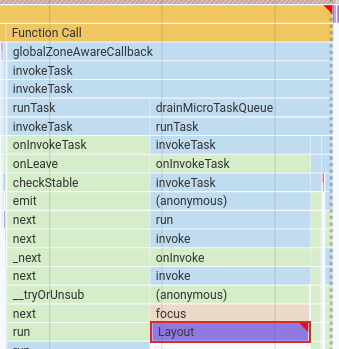
Let's see the reason:
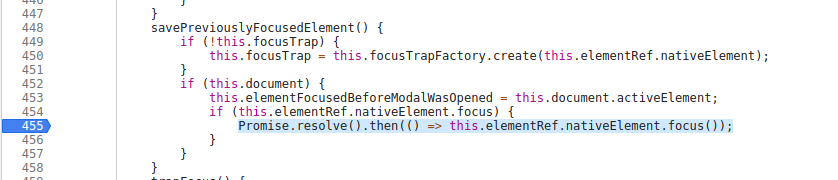
Well, it schedules a microtask that causes tick() to be run, but it's not required since there's a native DOM API call. I've replaced it with the following code:
window.__zone_symbol__requestAnimationFrame(() => this.elementRef.nativeElement.focus());
There's no frame drop when the focus() happens for now since it happens in the next rendering frame.
Let's look at another frame drop:
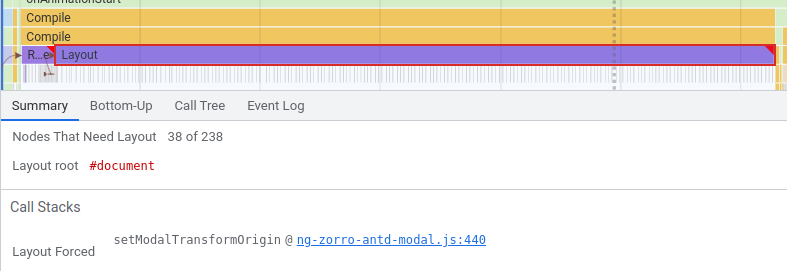
Let's see the reason:

Let's wrap it again:
window.__zone_symbol__requestAnimationFrame(() => {
  const previouslyDOMRect = this.elementFocusedBeforeModalWasOpened.getBoundingClientRect();
  const lastPosition = getElementOffset(this.elementFocusedBeforeModalWasOpened);
  const x = lastPosition.left + previouslyDOMRect.width / 2;
  const y = lastPosition.top + previouslyDOMRect.height / 2;
  const transformOrigin = `${x - modalElement.offsetLeft}px ${y - modalElement.offsetTop}px 0px`;
  this.render.setStyle(modalElement, 'transform-origin', transformOrigin);
});
In the end there's no frame drop when the modal is opened:

# Lazy-Loading Dialog Components
You can lazy load the dialog component and delay the dialog creation to prevent the frame drop. Consider the following code:
@Component({
  selector: 'app-root',
  template: '<button (click)="openDialog()">Open dialog</button>',
  changeDetection: ChangeDetectionStrategy.OnPush,
})
export class AppComponent {
  private readonly dialog = inject(MatDialog);

  openDialog(): void {
    import(/* webpackChunkName: 'dialog' */ './dialog').then(({ AppDialog }) => {
      this.dialog.open(AppDialog, {
        width: '250px',
        data: {
          name: 'Jack',
          animal: 'Cat',
        },
      });
    });
  }
}
We should note that import() is a specific syntax provided by Webpack that combines the functionality of a Promise and the script.onload event. The load event is an asynchronous event in the DOM. However, the execution of its handler may occur within the same rendering frame. When calling dialog.open, it triggers style recalculations and layout updates, as it needs to create an overlay and render the modal dialog. To delay this operation, we can use requestAnimationFrame and schedule it to execute at the beginning of the next frame:
@Component({
  selector: 'app-root',
  template: '<button (click)="openDialog()">Open dialog</button>',
  changeDetection: ChangeDetectionStrategy.OnPush,
})
export class AppComponent {
  private readonly ngZone = inject(NgZone);
  private readonly dialog = inject(MatDialog);

  openDialog(): void {
    this.ngZone.runOutsideAngular(() => {
      import(/* webpackChunkName: 'dialog' */ './dialog').then(({ AppDialog }) => {
        requestAnimationFrame(() => {
          this.ngZone.run(() => {
            this.dialog.open(AppDialog, {
              width: '250px',
              data: {
                name: 'Jack',
                animal: 'Cat',
              },
            });
          });
        });
      });
    });
  }
}
We don't necessarily have to use
requestAnimationFramein every case. It would be beneficial to record a flame graph and analyze the performance to determine if there are any frame drops when callingdialog.open. If frame drops are detected and it impacts the user experience, then wrappingdialog.openwithrequestAnimationFramecould be considered. By doing so, we can ensure a smoother user experience, especially on mobile devices where frame drops may be more noticeable. It's important to assess the specific performance characteristics and user impact before applying this optimization.
What if the user leaves the page before the dialog is loaded? Let's make it a bit reactive and cancellable:
@Component({
  selector: 'app-root',
  template: '<button (click)="openDialog()">Open dialog</button>',
  changeDetection: ChangeDetectionStrategy.OnPush,
})
export class AppComponent implements OnDestroy {
  private readonly ngZone = inject(NgZone);
  private readonly dialog = inject(MatDialog);

  private readonly destroy$ = new Subject<void>();

  ngOnDestroy(): void {
    this.destroy$.next();
  }

  openDialog(): void {
    this.ngZone.runOutsideAngular(() => {
      from(import(/* webpackChunkName: 'dialog' */ './dialog'))
        .pipe(observeOn(animationFrameScheduler), takeUntil(this.destroy$))
        .subscribe(({ AppDialog }) => {
          this.ngZone.run(() => {
            this.dialog.open(AppDialog, {
              width: '250px',
              data: {
                name: 'Jack',
                animal: 'Cat',
              },
            });
          });
        });
    });
  }
}
This is also one of the reasons why you have to always unsubscribe. Absolutely, ensuring proper cleanup and unsubscribing from subscriptions is crucial to prevent unnecessary code execution and potential performance issues. By adhering to this principle, you can minimize the risk of executing unnecessary JavaScript code and ensure a smoother user experience by avoiding any unnecessary frame drops or performance issues.