# Garbage Collection
Memory management is a complex topic in itself. It is essential to exercise caution when using asynchronous APIs that are not tied to a component lifecycle. This includes observables returned by methods such as timer, interval, or HttpClient, as well as any EventTarget, Promise, and so on.
Let's consider HttpClient as an example. The debate over whether to unsubscribe or not has been ongoing for several years, particularly regarding this matter:
class MyComponent {
  data;

  constructor(private readonly http: HttpClient) {}

  ngOnInit(): void {
    // Should we unsubscribe in ngOnDestroy?
    this.http.getSomething().subscribe(data => {
      this.data = data;
    });
  }
}
I really love this article that describes when you have to unsubscribe: https://medium.com/angular-in-depth/why-you-have-to-unsubscribe-from-observable-92502d5639d0 (opens new window).
With this in mind, let's dive into technical details a bit. Let's explore what can be potential causes of memory leaks.
This doesn't create a memory leak:
this.http.getSomething().subscribe(data => {
  console.log(data);
});
But this does:
this.http.getSomething().subscribe(data => {
  this.data = data;
});
Since it captures this, as long as there is a reference to data => (this.data = data), this will not be garbage collected. You might argue that the observable will eventually complete and the callback reference will be removed.
But why would you want to execute the
nextcallback when the component is already destroyed?
These memory leaks are related to how garbage collection works in JavaScript. First, garbage collection only removes objects during a sweep, which can occur after a certain period of time (e.g., 5 seconds or 5 minutes) or even during the execution of code. Second, V8, the JavaScript engine, implements two garbage collectors that target young and old generations of objects, respectively. This distinction helps manage memory and determine which objects are eligible for removal during garbage collection. This means that not every sweep removes all of the objects:
- Objects created between the last sweep and the current sweep are allocated in the "nursery" space of the young generation.
- During each sweep, the garbage collector attempts to remove objects in the "nursery" space.
- An object that survives one sweep is moved into the "intermediate" space of the young generation.
- Not every sweep removes objects in the "intermediate" space.
- An object that survives two sweeps is eventually moved into the "old" generation.
The "old" generation contains long-lived objects that are not immediately removed. The garbage collector does not attempt to clean them unless there is a significant memory shortage.
Additionally, some old objects can be considered "immortal" and can be moved to the read-only space. For example, undefined and null are treated as read-only objects. This means they are not subject to modification and can be stored in a separate space optimized for read-only access.
Overall, these details shed light on how long-lived objects are handled in garbage collection and the existence of special spaces like the read-only space for certain objects.
Let's look at the following image; we can see the PerformanceCookbookLeaker which subscribes to the Observable, that Observable captures the callback:
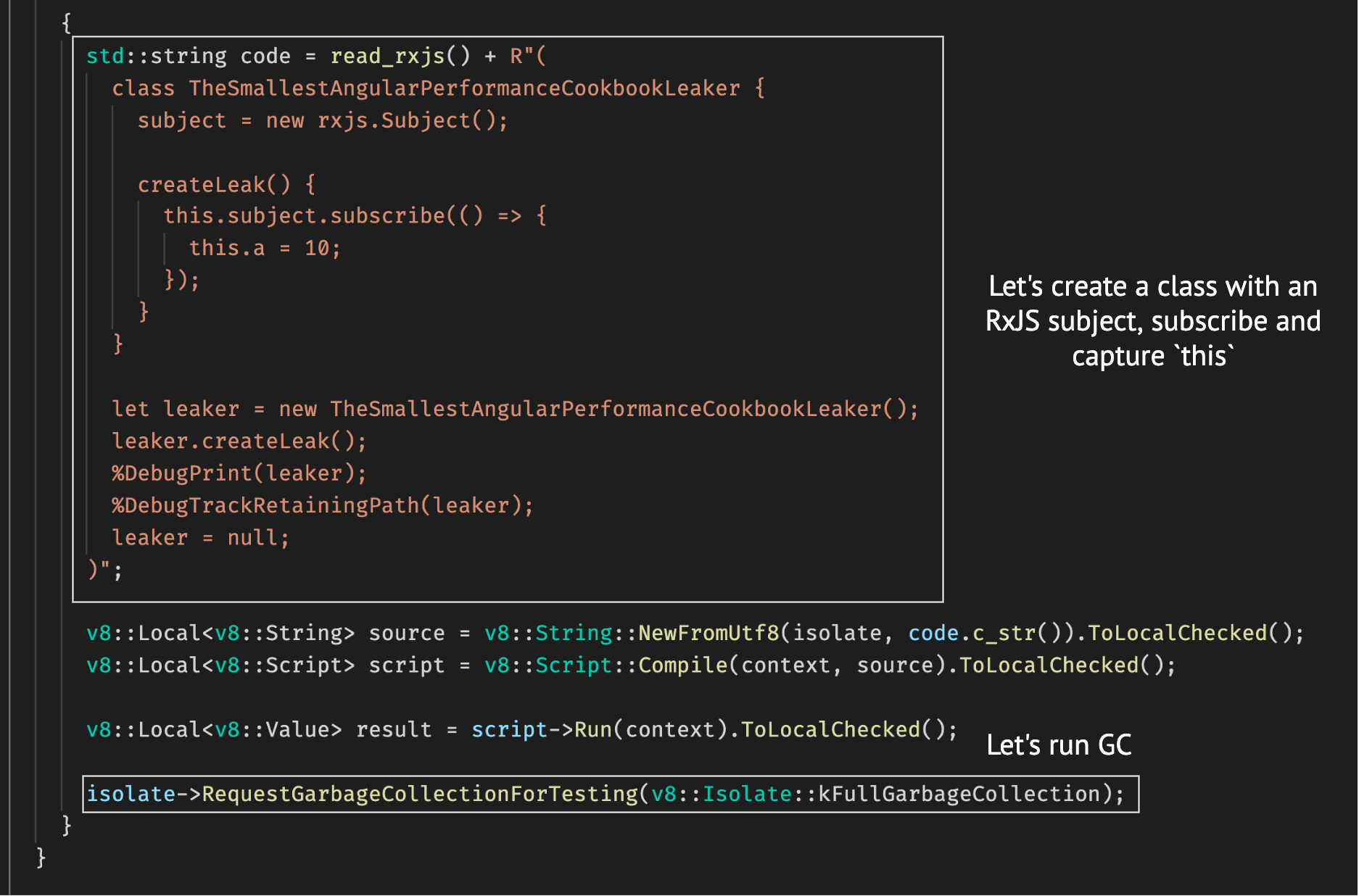
I've compiled the code through g++ and linked it w/ V8:
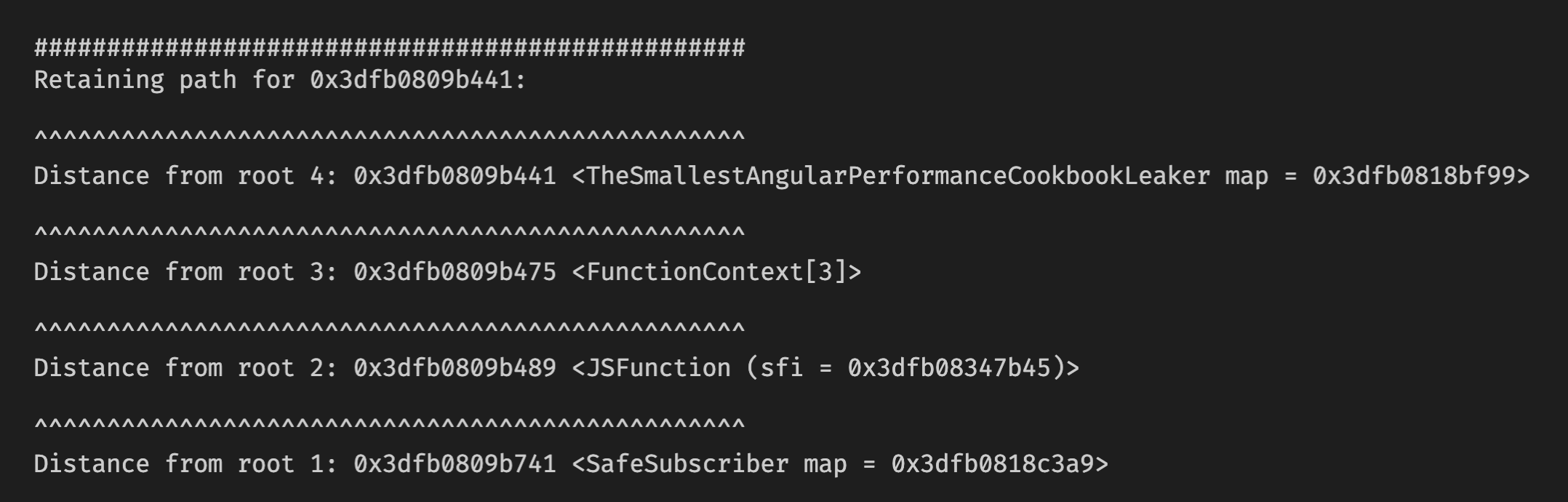
This seems like the leaker object, despite the garbage collection being executed, has not been successfully garbage-collected. The statement leaker = null only removes the reference to the object without directly triggering garbage collection.
It's important to note that setting an object reference to null does not guarantee immediate garbage collection. The garbage collector will eventually detect and collect objects that are no longer referenced and are eligible for garbage collection based on its own algorithms and heuristics.
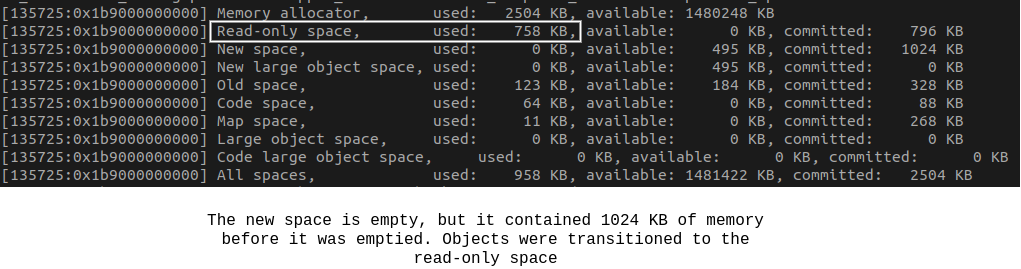
Well, the object has been transitioned to the read-only space, which contains objects that are considered immortal and immovable. The V8's garbage collector is intelligent and predictive, and it may eventually move these objects to the intermediate space or old space based on its algorithms and heuristics.
The longer the delay before the observable completes, the higher the likelihood that the instance will become part of the second generation. The garbage collector will not attempt to clean it unless there is a memory shortage or the system is running out of memory.
Furthermore, this behavior is not limited to observables but applies to all entities associated with callbacks in general. This information emphasizes the importance of understanding the lifecycle and memory management of objects tied to callbacks to avoid potential memory leaks or inefficient memory usage.
Let's have a look at the following code:
@Component({
  selector: 'app-leaker',
  template: '',
})
export class TheSmallerAngularPerformanceCookbookLeaker implements OnInit {
  private captureMe!: string;

  constructor(
    private readonly renderer: Renderer2,
    private readonly host: ElementRef<HTMLElement>,
  ) {}

  ngOnInit(): void {
    this.renderer.listen(this.host.nativeElement, 'click', this.onClick);
  }

  private onClick = () => {
    this.captureMe = 'John Doe';
  };
}
I'll bind ngIf to the component so the parent template looks as follows:
<app-root>
  <app-leaker *ngIf="shown"></app-leaker>
  <button (click)="shown = !shown">Destroy</button>
</app-root>
Mozilla has a heap analyzer. Let's click the button ( to trigger the removal of the app-leaker object from the DOM) and wait a bit since garbage collection may occur when the user is idle or during periods of low activity:
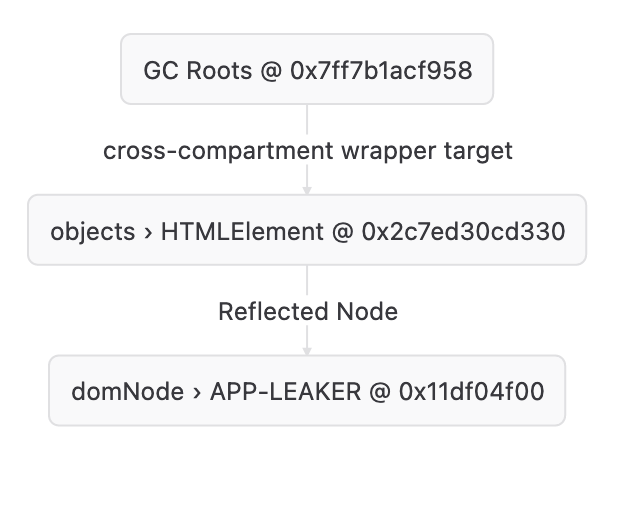
We can see the element is still retained and cannot be garbage collected. We can use the fxsnapshot to query the snapshot and see the captured map:
$ fxsnapshot renderer.fxsnapshot 'nodes { id: 0x2c7ed30cd330 }'

labeled expr: PredicateOp { id: λ0, stream: Var(nodes), op: Filter, predicate: And([Field("id", Expr(Number(48923218334512)))]) }
CaptureMap {
    lambdas: IdVec(
        [
            LambdaInfo {
                arity: 0,
                parent: None,
                captured: {},
            },
        ],
        PhantomData,
    ),
    uses: IdVec(
        [],
        PhantomData,
    ),
}
plan: NodesById(
    Const(
        48923218334512,
    ),
)
[
Node { id: 0x2c7ed30cd330, coarseType: Object, typeName: "JSObject", size: 104, JSObjectClassName: b"HTMLElement" }
]
The element is captured by a lambda (specifically the onClick). The component references the element through the host property, indicating a connection between the component and the element. Additionally, the element references the component through the __zone_symbol__clickfalse property, establishing a reference from the element back to the component.
These references and connections between the element and the component can contribute to the retention of the element in memory, preventing it from being garbage collected.
Let's look at another example:
@Component({
  selector: 'app-leaker',
  template: '',
})
export class TheSmallerAngularPerformanceCookbookLeaker implements OnInit {
  private captureMe!: string;

  constructor(private readonly http: HttpClient) {}

  ngOnInit(): void {
    this.http.get('http://localhost:8080/me').subscribe(this.onNext);
  }

  private onNext = () => {
    this.captureMe = 'John Doe';
  };
}
I'll make a snapshot again:
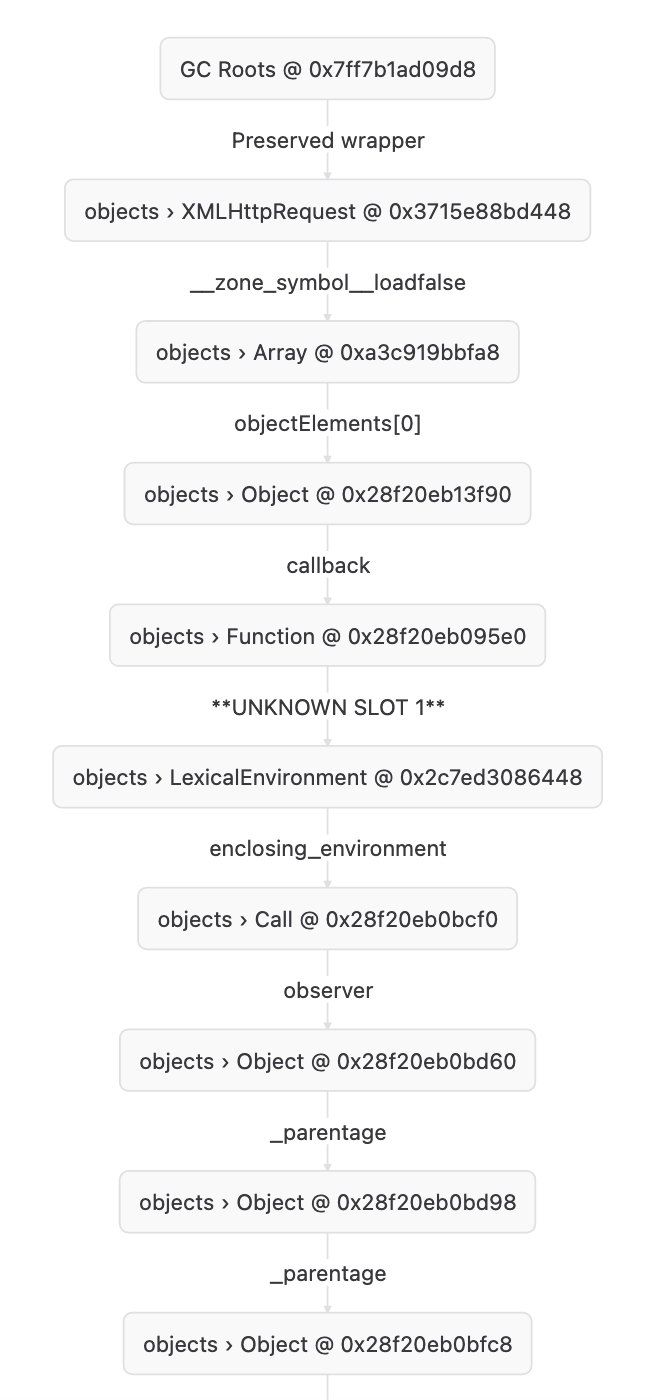
The retaining path is huge now, I'll run the fxsnapshot again:
$ fxsnapshot observable.fxsnapshot 'nodes { id: 0x11df04d00 }'

labeled expr: PredicateOp { id: λ0, stream: Var(nodes), op: Filter, predicate: And([Field("id", Expr(Number(4797254912)))]) }
CaptureMap {
    lambdas: IdVec(
        [
            LambdaInfo {
                arity: 0,
                parent: None,
                captured: {},
            },
        ],
        PhantomData,
    ),
    uses: IdVec(
        [],
        PhantomData,
    ),
}
plan: NodesById(
    Const(
        4797254912,
    ),
)
[
Node { id: 0x11df04d00, coarseType: DOMNode, typeName: "nsIContent", size: 496, descriptiveTypeName: "APP-LEAKER" }
]
The app-leaker is captured by a lambda function once again; at the end, this is XMLHttpRequest event listeners, which are removed on the subscription teardown. There is no explicit unsubscribe during the destruction of the component when using HttpClient.get.
We can also make snapshots in Chrome. Let's look at the following piece of code:
@Component({
  selector: 'app-root',
  template: '<button (click)="destroy()">Destroy</button>',
})
export class AppComponent {
  destroyed = false;

  private readonly ngModuleRef = inject(NgModuleRef);

  constructor() {
    // Use the native `setTimeout`.
    window[Zone.__symbol__('setTimeout') as 'setTimeout'](() => {
      console.log(this);
    }, 1e6);
  }

  destroy(): void {
    this.destroyed = true;
    this.ngModuleRef.destroy();
  }
}
The NgModuleRef.destroy() is responsible for completely destroying the app by executing all ngOnDestroy lifecycle hooks, removing DOM nodes, and performing other necessary cleanup actions. Let's click the button and look at the heap snapshot:
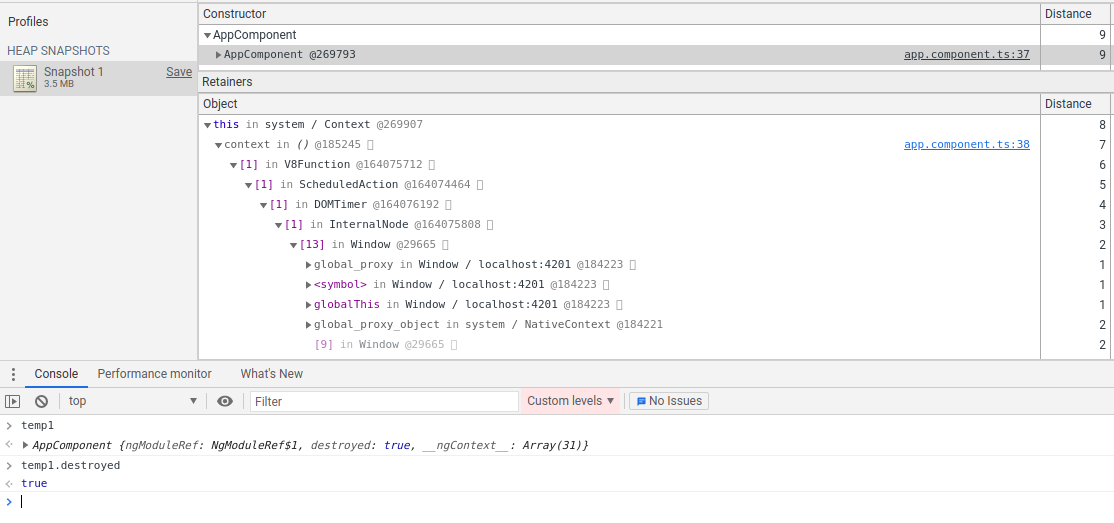
Well, as you can see, the DOM timer callback captures this and prevents it from being GC'd.
# Conclusion
Avoid reinventing the wheel and effectively manage subscriptions in your codebase. The key points highlighted are:
- Utilize techniques like
takeUntilDestroyed(since Angular 16),takeUntil,subscription.add(), or external packages likesubsinkto handle subscriptions and ensure proper cleanup. - Be cautious when using
toPromiseorfirstValueFrommethods, as they are not cancellable. If an observable never completes, the corresponding promise will never resolve. Additionally,toPromise()may resolve toundefinedif the observable completes before emitting a value. It's important to handle these scenarios appropriately to avoid exceptions or unexpected behavior. - Take into account third-party libraries that provide event listeners. When using objects that have
addEventListeneror on methods, it's crucial to ensure that corresponding event listeners can be removed later on. Failing to remove event listeners can lead to memory leaks or unwanted behavior:
import * as braintree from 'braintree-web';

export class AppComponent implements OnInit, OnDestroy {
  private readonly destroy$ = new Subject<void>();

  ngOnInit(): void {
    from(braintree.hostedFields.create({ ... }))
      .pipe(takeUntil(this.destroy$))
      .subscribe(hostedFieldsInstance => {
        this.hostedFieldsInstance = hostedFieldsInstance;

        // Whoops, we have a leak here (`this` is captured)
        this.hostedFieldsInstance.on('blur', event => {
          this.handleBlurEvent(event);
        });
      });
  }

  ngOnDestroy(): void {
    this.destroy$.next();
  }
}
Let's use the fromEvent since it supports adding event listeners through the JQuery-style:
export class AppComponent implements OnInit, OnDestroy {
  private readonly destroy$ = new Subject<void>();

  ngOnInit(): void {
    from(braintree.hostedFields.create({ ... }))
      .pipe(takeUntil(this.destroy$))
      .subscribe(hostedFieldsInstance => {
        this.hostedFieldsInstance = hostedFieldsInstance;

        fromEvent(this.hostedFieldsInstance, 'blur')
          .pipe(takeUntil(this.destroy$))
          .subscribe(event => {
            this.handleBlurEvent(event);
          });
      });
  }

  ngOnDestroy(): void {
    this.destroy$.next();
  }
}