# Infrastructure Level (AWS)
# Serving Static Assets
There are different strategies for serving static assets, all aiming to minimize network traffic and reduce client latency.
# The Most Basic Architecture
CloudFront has built-in Gzip and Brotli compression. I have noticed that CloudFront does not always use the highest compression level, considering the compressed file size. It appears to choose between compression levels 2 and 5, with the compression level increasing for larger files. The highest compression level is sensitive to performance, but it is only applied once since the content is cached after compression.
Please refer to the CloudFormation template below. Note that I already have an existing S3 bucket, Route53 hosted zone, and issued ACM certificate:
See the CloudFormation template
AWSTemplateFormatVersion: 2010-09-09

Parameters:
  BucketName:
    Type: String

  DomainName:
    Type: String

  CertificateArn:
    Type: String

  HostedZoneId:
    Type: AWS::Route53::HostedZone::Id

Resources:
  CloudFrontOriginAccessIdentity:
    Type: AWS::CloudFront::CloudFrontOriginAccessIdentity
    Properties:
      CloudFrontOriginAccessIdentityConfig:
        Comment: !Sub Identity for distribution of ${DomainName}

  BucketPolicy:
    Type: AWS::S3::BucketPolicy
    Properties:
      Bucket: !Ref BucketName
      PolicyDocument:
        Version: 2012-10-17
        Statement:
          - Effect: Allow
            Action: s3:GetObject
            Resource: !Sub arn:aws:s3:::${BucketName}/*
            Principal:
              AWS: !Sub arn:aws:iam::cloudfront:user/CloudFront Origin Access Identity ${CloudFrontOriginAccessIdentity}

  CloudFrontDistribution:
    Type: AWS::CloudFront::Distribution
    Properties:
      DistributionConfig:
        Enabled: true
        PriceClass: PriceClass_100
        DefaultRootObject: index.html
        Comment: !Sub CloudFront distribution for ${DomainName}
        Aliases:
          - !Ref DomainName
        ViewerCertificate:
          SslSupportMethod: sni-only
          AcmCertificateArn: !Ref CertificateArn
        Origins:
          - Id: s3-origin
            DomainName: !Sub ${BucketName}.s3.amazonaws.com
            S3OriginConfig:
              OriginAccessIdentity: !Sub origin-access-identity/cloudfront/${CloudFrontOriginAccessIdentity}
        DefaultCacheBehavior:
          Compress: true
          TargetOriginId: s3-origin
          ViewerProtocolPolicy: redirect-to-https
          ForwardedValues:
            QueryString: false
        CacheBehaviors:
          - Compress: true
            TargetOriginId: s3-origin
            ViewerProtocolPolicy: redirect-to-https
            PathPattern: /assets/*
            # This is a managed CloudFront policy which enables Brotli compression.
            CachePolicyId: 658327ea-f89d-4fab-a63d-7e88639e58f6
            ForwardedValues:
              QueryString: false

  RecordSet:
    Type: AWS::Route53::RecordSet
    Properties:
      Type: A
      Name: !Ref DomainName
      HostedZoneId: !Ref HostedZoneId
      AliasTarget:
        # Default CloudFront zone ID.
        HostedZoneId: Z2FDTNDATAQYW2
        DNSName: !GetAtt CloudFrontDistribution.DomainName

# The Most Complicated and Unwanted Architecture
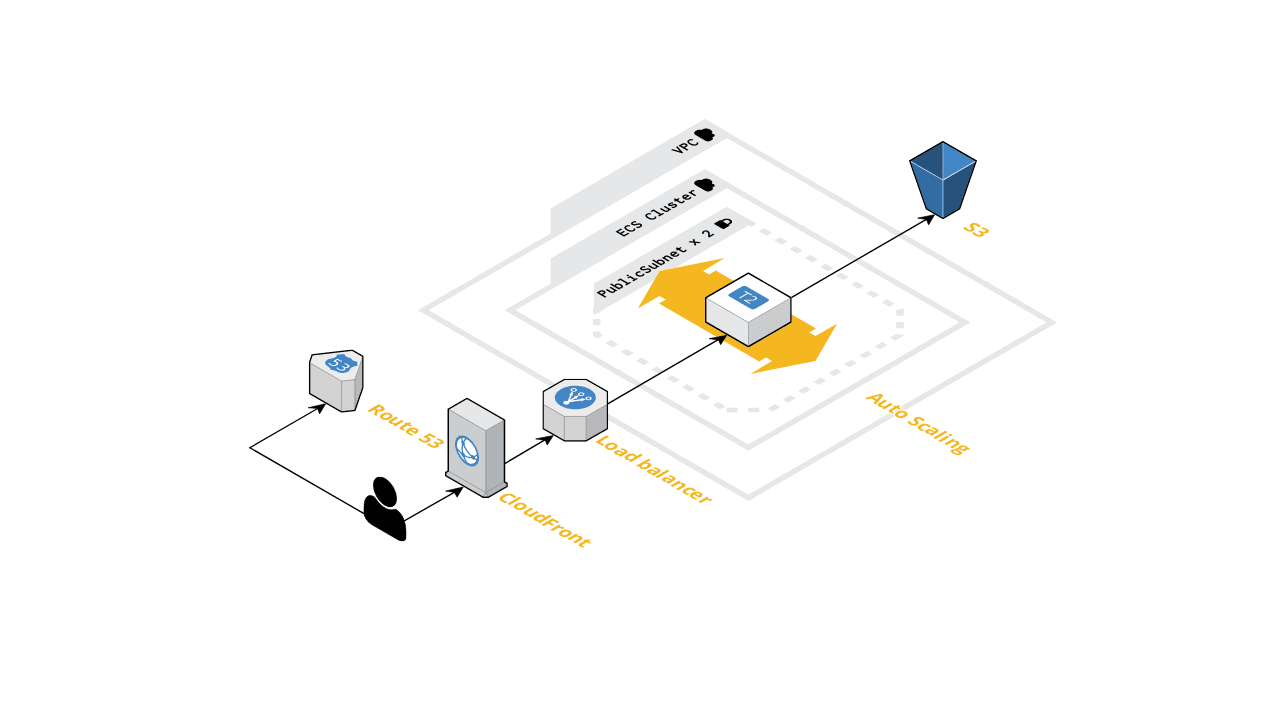
Previously, it was possible to use the Nginx server as a proxy between the bucket and CloudFront before the existence of the Lambda@Edge service and before CloudFront supported Brotli compression. The Nginx server was compiled with a Brotli module and provided the highest compression level.
It is not recommended to deploy everything onto a single EC2 instance as it would not be fault-tolerant, for example, in the event of a server failure. To achieve fault tolerance, the Nginx server could have been deployed to an autoscaling group with a DesiredCapacity of 2, spread across different availability zones (AZs). Since CloudFront cannot directly route traffic to EC2 instances, placing an Application Load Balancer (ALB) behind the EC2 instance made sense.
So, the flow is as follows:
- The client resolves the IP address of the nearest CloudFront server (edge location).
- The client sends a
GET /main.jsHTTP request. - CloudFront routes the traffic to an Application Load Balancer (ALB), and the ALB further routes the traffic to the EC2 instance with Nginx installed.
- The Nginx server routes the traffic to S3, receives the response, and applies compression (Gzip or Brotli) using the highest compression level. It then caches the compressed files and sends them back with
Content-EncodingandContent-Lengthheaders. - CloudFront caches the response and subsequently does not send traffic to Nginx again (unless the edge locations are invalidated).
It was possible to create a bucket policy with a custom user agent to keep the bucket private. The IAM service would validate the user agent and forward the request to S3:
BucketPolicy:
  Type: AWS::S3::BucketPolicy
  Properties:
    Bucket: !Ref BucketName
    PolicyDocument:
      Version: 2012-10-17
      Statement:
        - Effect: Allow
          Action: s3:GetObject
          Principal: '*'
          Resource: !Sub arn:aws:s3:::${BucketName}/*
          Condition:
            StringLike:
              aws:UserAgent: this_should_be_very_secur3
The user agent was also duplicated inside the Nginx config:
server {
  location / {
    limit_except GET {
      deny all;
    }

    set $aws_bucket "my-bucket";

    proxy_set_header User-Agent this_should_be_very_secur3;
    proxy_buffering off;
    proxy_pass https://${aws_bucket}.s3.${aws_region}.amazonaws.com/$request_uri;
  }
}
It isn't straightforward to maintain, and it's not cost-effective.
# Lambda@Edge
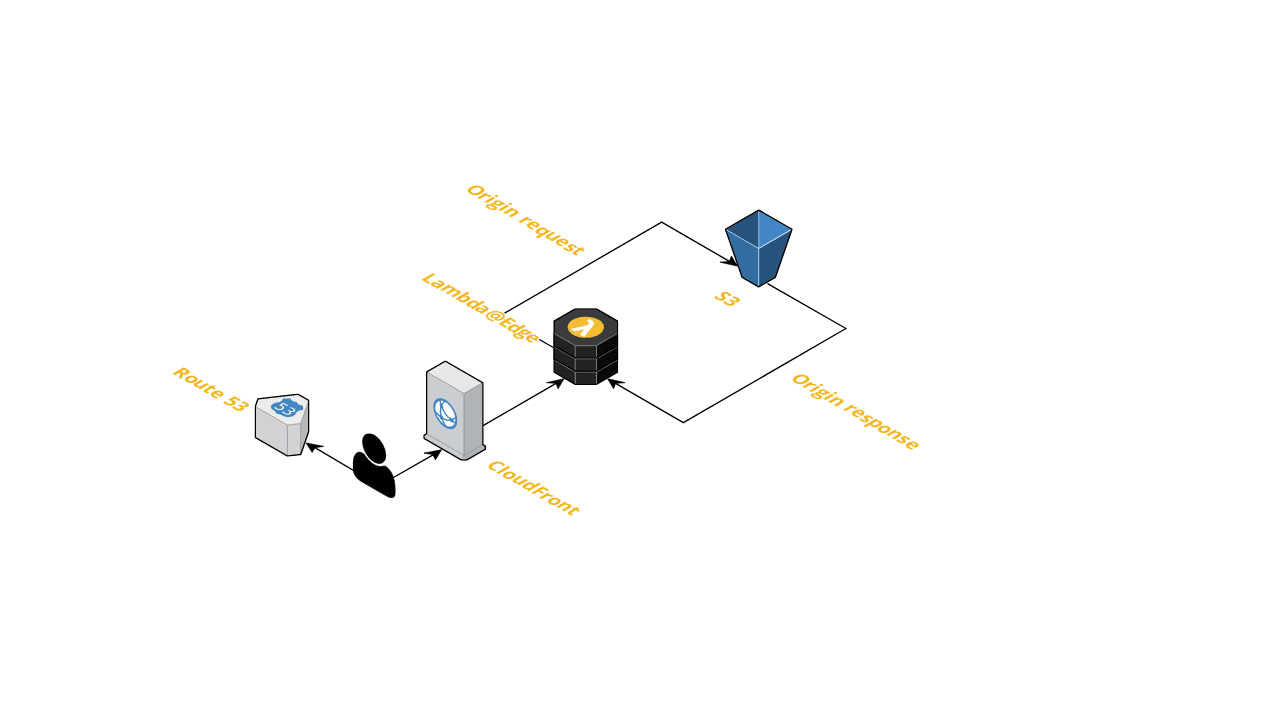
The edge lambda is a lambda function that is replicated across CloudFront edge locations and can be triggered by CloudFront. It can only be created in the us-east-1 region.
Please refer to the CloudFormation template below. Note that the Custom::CrossRegionStack is a custom resource used to create a cross-region stack. The code for this resource will be provided later as it is not needed at this moment. This lambda function accepts parameters such as region and template body. It is responsible for creating a CloudFormation stack in another region, specified through the Region property.
As part of our continuous delivery process, we can pre-compress all static files, enabling us to serve static files with the highest compression level and minimize network throughput.
Collapse the CloudFormation template
AWSTemplateFormatVersion: 2010-09-09

Resources:
  EdgeLambdaRole:
    Type: AWS::IAM::Role
    Properties:
      Path: /
      ManagedPolicyArns:
        - arn:aws:iam::aws:policy/service-role/AWSLambdaBasicExecutionRole
      AssumeRolePolicyDocument:
        Version: 2012-10-17
        Statement:
          - Effect: Allow
            Action: sts:AssumeRole
            Principal:
              Service:
                - lambda.amazonaws.com
                - edgelambda.amazonaws.com

  EdgeLambdaCrossRegionStack:
    Type: Custom::CrossRegionStack
    Properties:
      ServiceToken: !Ref CrossRegionLambdaArn
      # Edge lambdas have to be created in the us-east-1 region
      Region: us-east-1
      StackName: edge-lambda-stack
      Parameters:
        EdgeLambdaRoleArn: !GetAtt EdgeLambdaRole.Arn
      TemplateBody: |
        AWSTemplateFormatVersion: 2010-09-09

        Parameters:
          EdgeLambdaRoleArn:
            Type: String

        Resources:
          EdgeLambda:
            Type: AWS::Lambda::Function
            DeletionPolicy: Retain
            Properties:
              Runtime: nodejs12.x
              Timeout: 5
              MemorySize: 128
              Role: !Ref EdgeLambdaRoleArn
              Handler: index.handler
              Code:
                ZipFile: |
                  function parseAcceptEncodingHeader(request) { ... }

                  async function handler(event, context) {
                    const { request } = event.Records[0].cf;
                    const { br, gz } = parseAcceptEncodingHeader(request);
                    if (br) {
                      request.uri += '.br';
                    } else if (gz) {
                      request.uri += '.gz';
                    }
                    return request;
                  }

                  module.exports = { handler };

          EdgeLambdaVersion:
            Type: AWS::Lambda::Version
            Properties:
              FunctionName: !Ref EdgeLambda

        Outputs:
          EdgeLambdaVersionArn:
            Value: !Ref EdgeLambdaVersion

  CloudFrontDistribution:
    Type: AWS::CloudFront::Distribution
    Properties:
      DistributionConfig:
        ...
        DefaultCacheBehavior:
          ...
          LambdaFunctionAssociations:
            - EventType: origin-request
              LambdaFunctionARN: !GetAtt EdgeLambdaCrossRegionStack.EdgeLambdaVersionArn
# Comparison
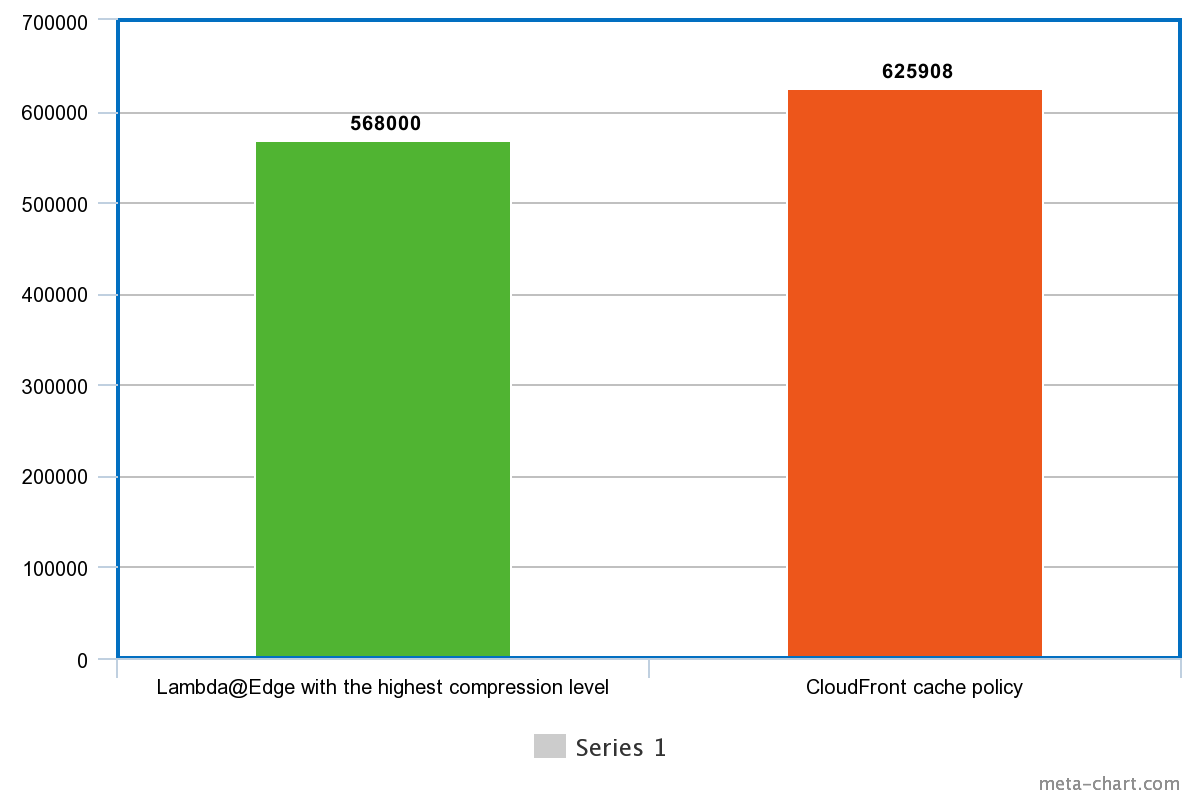
- The
main.jsfile is 2.8M uncompressed. - CloudFront compressed it to 625908 bytes size.
brotli -k9compressed it to 568000 bytes size.
The highest compression level saves traffic by 10-15% (depends on the file content, different compression levels can differ for various files).
# Continious delivery example
Collapse the CodeBuild template
version: 0.2

phases:
  install:
    runtime-versions:
      nodejs: 14
    finally:
      - echo Installation done
  build:
    commands:
      - echo Entering build phase...
      # It's better to have a custom Docker image that has `brotli` pre-installed
      # or use a Webpack plugin.
      - apt-get update && apt-get install -y brotli
      - yarn --pure-lockfile
      - yarn ng build --configuration production

    finally:
      - echo Build completed on `date`

  post_build:
    commands:
      # Empty S3 bucket.
      - aws s3 rm s3://${S3_BUCKET} --recursive
      - echo S3 bucket is emptied.
      - aws s3 sync
      # Copy non-compressed files.
      - aws s3 sync ./dist/${APP_NAME} s3://${S3_BUCKET} --exclude ".gz" --exclude ".br"
      # Gzip with the highest compression level.
      - gzip ./dist/${APP_NAME} -rk9
      - aws s3 sync ./dist/${APP_NAME} s3://${S3_BUCKET} --include ".gz" --content-encoding gzip
      # Brotli with the highest compression level.
      - brotli ./dist/${APP_NAME} -rk9
      - aws s3 sync ./dist/${APP_NAME} s3://${S3_BUCKET} --include ".br" --content-encoding br
      # Invalidate the edge cache.
      - aws cloudfront create-invalidation --distribution-id ${DISTRIBUTION_ID} --paths /index.html --output json
      - echo Build completed on `date`

artifacts:
  files:
    - '**/*'
  discard-paths: yes
  base-directory: 'dist*'
# Lambda Warmup
We need to keep our Edge Lambda warm because the execution environment will not remain active if the Lambda is not invoked within the duration that AWS keeps the Lambda environment active, which is 15 minutes. We can create a CloudWatch alarm that will invoke our warm-up Lambda every 5 minutes. The warm-up Lambda will make a simple HTTP request to our hostname:
service: lambda-warmup

frameworkVersion: 3

provider:
  name: aws
  runtime: nodejs18.x
  memorySize: 128

functions:
  warmup:
    handler: src/handler.warmup
    environment:
      HOST_NAME: ${param:hostName}

plugins:
  - serverless-plugin-typescript

resources:
  LambdaWarmUpLogGroup:
    Type: AWS::Logs::LogGroup
      LogGroupName: !Sub /aws/lambda/${WarmupLambdaFunction}
      RetentionInDays: 1

  LambdaWarmUpRule:
    Type: AWS::Events::Rule
    Properties:
      ScheduleExpression: rate(5 minutes)
      State: ENABLED
      Targets:
        - Arn: !GetAtt WarmupLambdaFunction.Arn
          Id: TargetWarmupLambdaFunction

  LambdaWarmUpPermission:
    Type: AWS::Lambda::Permission
    Properties:
      FunctionName: !Ref WarmupLambdaFunction
      Action: lambda:InvokeFunction
      Principal: events.amazonaws.com
      SourceArn: !GetAtt WarmupLambdaFunction.Arn
// src/handler.ts
import { envsafe, str } from 'envsafe';
import * as https from 'https';
import { ScheduledHandler } from 'aws-lambda';

const environment = envsafe({
  HOST_NAME: str(),
});

export const warmup: ScheduledHandler = (event, content, callback) => {
  const options = {
    method: 'GET',
    host: environment.HOST_NAME,
    path: '/',
    headers: {
      'content-type': 'application/x-www-form-urlencoded',
    },
  };

  const request = https.request(options, response => {
    if (response.statusCode === 200) {
      callback(null);
    } else {
      callback(new Error(`Unexpected status code: ${response.statusCode}`));
    }
  });

  request.end();
};