# Webpack
Custom Webpack configuration is one of the issues in Angular since Angular does not natively allow extending the Webpack configuration. In the past, it was possible to do so using ng eject. However, nowadays, you can use the @angular-builders/custom-webpack package, which provides different builders for serving and building applications.
Let's install the package:
yarn add -D @angular-builders/custom-webpack
We have to edit the angular.json file and change builders:
"architect": {
  "build": {
    "builder": "@angular-builders/custom-webpack:browser",
    "options": {
      "customWebpackConfig": {
        "path": "webpack.config.js"
      }
    }
  },
  "serve": {
    "builder": "@angular-builders/custom-webpack:dev-server"
  }
}
Let's create the webpack.config.js file and place the following content:
module.exports = config => {
  console.log(config);
  return config;
};
It should log the config to the terminal once you run ng serve.
# Plugins
The configuration can be extended with custom plugins. For example, let's consider the case when you are using the moment package, and this is what happens when you import the moment package:

Let's install the moment-locales-webpack-plugin:
yarn add -D moment-locales-webpack-plugin
And extend the configuration:
const MomentLocalesPlugin = require('moment-locales-webpack-plugin');

module.exports = config => {
  config.plugins.push(new MomentLocalesPlugin());
  return config;
};
The result looks as follows:

The same thing can be achieved for stripping timezones by using the moment-timezone-data-webpack-plugin.
# Tree-Shaking with DefinePlugin
TThe DefinePlugin can be used to provide compile-time constants and for tree-shaking purposes. Let's assume that you want to skip bundling the @ngrx/store-devtools when building the app in production. In this case, you can provide a compile-time constant called isDevelopmentMode through the DefinePlugin:
const webpack = require('webpack');

module.exports = config => {
  config.plugins.push(
    new webpack.DefinePlugin({
      isDevelopmentMode: JSON.stringify(config.mode !== 'production'),
    }),
  );

  return config;
};
⚠️ Angular also provides
ngDevMode, but only through Terser global definitions. This means thatngDevModewill be replaced only during the production build, but the Angular compiler performs all transformations earlier. Consequently, Terser'sngDevModeis not usable inside Angular decorators. For example, usingimports: [ngDevMode ? SomeModule : []]will result in an error during compilation, as the Angular compiler treatsngDevModeas a runtime variable and cannot statically evaluate the expression.
We'll also need to provide custom typings to expose the isDevelopmentMode variable:
declare const isDevelopmentMode: boolean;
Now the variable can be used as follows:
@NgModule({
  imports: [isDevelopmentMode ? StoreDevtoolsModule.instrument() : []],
})
export class AppModule {}
Or with bootstrapApplication:
bootstrapApplication(AppComponent, {
  providers: [isDevelopmentMode ? importProvidersFrom(StoreDevtoolsModule.instrument()) : []],
});
Let's consider a more complex use case. Suppose we have a PerformanceService that measures the rendering time. In this scenario, we would like to use the service only in development mode but have it tree-shaken in production:
@Component({
  selector: 'app-root',
  templateUrl: './app.component.html',
  providers: [isDevelopmentMode ? PerformanceService : []],
})
export class AppComponent implements AfterViewInit {
  private performanceService?: PerformanceService;

  constructor(injector: Injector) {
    if (isDevelopmentMode) {
      this.performanceService = injector.get(PerformanceService);
      this.performanceService.startMeasuring('app-root');
    }
  }

  ngAfterViewInit(): void {
    if (isDevelopmentMode) {
      this.performanceService!.stopMeasuring('app-root');
    }
  }
}
# Tree-Shaking Server-Side Code
Have you ever thought about the fact that server-side code ends up in the client bundle, even though this code is never executed in the browser?
if (isPlatformServer(platformId)) {
  // Do some server-side stuff...
}
Well, the Angular Universal team does not recommend using isPlatformBrowser and isPlatformServer. Instead, they recommend creating separate services for the browser and server modules. The approach looks as follows:
@Injectable({ providedIn: 'root' })
export class ArticleService {
  constructor(private readonly transferState: TransferState) {}

  getArticle(id: string): Observable<Article> {
    const key = makeStateKey<Article>(`article:${id}`);
    const article = this.transferState.get(key, null!);
    return of(article);
  }
}

@Injectable()
export class ServerArticleService {
  constructor(private readonly http: HttpClient, private readonly transferState: TransferState) {}

  getArticle(id: string): Observable<Article> {
    return this.http.get<Article>(`${environment.apiUrl}/api/article/${params.id}`).pipe(
      tap(article => {
        const key = makeStateKey<Article>(`article:${id}`);
        this.transferState.set(key, article);
      }),
    );
  }
}

@NgModule({
  providers: [
    {
      provide: ArticleService,
      useClass: ServerArticleService,
    },
  ],
})
export class AppServerModule {}
On the other hand, this approach will increase software complexity, as developers will need to maintain both browser and server services. It becomes even more complicated when services are provided at the component level.
It's easier to maintain simple if-conditions. With this in mind:
Duplication is far cheaper than the wrong abstraction © Sandy Metz
Moreover, if you search for "isPlatformServer" on GitHub, you will find a considerable amount of code being written and supported.
Now, let's consider the following example, which is used for demonstration purposes. I intentionally haven't decoupled the http.get into a separate service to keep it small and straightforward:
export class ArticleComponent {
  article$: Observable<Article>;

  constructor(
    http: HttpClient,
    route: ActivatedRoute,
    @Inject(PLATFORM_ID) platformId: string,
    meta: Meta,
    transferState: TransferState,
  ) {
    if (isPlatformServer(platformId)) {
      this.article$ = route.params.pipe(
        switchMap(params => http.get<Article>(`${environment.apiUrl}/article/${params.id}`)),
        tap(article => {
          meta.addTags([
            {
              property: 'og:type',
              content: 'article',
            },
            {
              property: 'og:title',
              content: article.title,
            },
            {
              property: 'og:url',
              content: article.url,
            },
            {
              property: 'og:image',
              content: article.image,
            },
          ]);

          const key = makeStateKey<Article>(`article:${article.id}`);
          transferState.set(key, article);
        }),
      );
    } else {
      this.article$ = route.params.pipe(
        map(params => {
          const key = makeStateKey<Article>(`article:${params.id}`);
          const article = transferState.get(key, null!);
          return article;
        }),
      );
    }
  }
}
If we build the app in production mode and open the file:
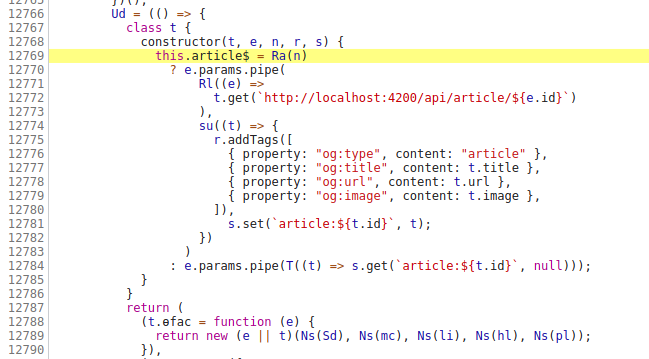
Whoops... everything has been bundled together. However, the server-side code is never executed on the client-side.
Let's edit our webpack.config.js:
const webpack = require('webpack');

module.exports = (config, options, { target }) => {
  const isServer = target === 'server';
  const isBrowser = !isServer;

  config.plugins.push(
    new webpack.DefinePlugin({
      global_isServer: JSON.stringify(isServer),
      global_isBrowser: JSON.stringify(isBrowser),
    }),
  );

  return config;
};
Previously, it was possible to find the
AngularCompilerPluginby usingconfig.plugins.find(plugin => plugin.constructor.name === 'AngularCompilerPlugin'). It had the_platformproperty, which defined the platform (browser or server). However, this approach stopped working when Angular introduced a new plugin calledAngularWebpackPlugin.
I've explicitly added the global_ prefix to avoid interfering with potentially existing variables named isServer or isBrowser, and you can name those constants as you prefer.
We have to provide custom typings for those constants:
declare const global_isServer: boolean;
declare const global_isBrowser: boolean;
Now, we can replace the isPlatformServer(platformId) with global_isServer:
export class ArticleComponent {
  article$: Observable<Article>;

  constructor(http: HttpClient, route: ActivatedRoute, meta: Meta, transferState: TransferState) {
    if (global_isServer) {
      this.article$ = route.params.pipe(...);
    } else {
      this.article$ = route.params.pipe(...);
    }
  }
}
Let's see the browser output:

Let's see the server output:

# Loaders
We can extend the configuration with custom loaders. Let's consider the scenario where we're using @ngx-translate/core as the i18n library, and translations are stored in JSON files:
@NgModule({
  imports: [
    TranslateModule.forRoot({
      defaultLanguage: 'en',
      loader: {
        provide: TranslateLoader,
        useValue: {
          getTranslation(lang: string) {
            return from(import(/* webpackChunkName: '[request]' */ `../assets/i18n/${lang}.json`));
          },
        },
      },
    }),
  ],
})
export class AppModule {}
Now, all .json files inside the assets/i18n folder will be included in the Webpack compilation. We can write a custom Webpack loader for flattening JSON files. Let's create the webpack/flatten-translations-loader.js file:
const flatten = require('flat');

/** @typedef {import('webpack').loader.LoaderContext} LoaderContext */

/**
 * @this LoaderContext
 * @param {string} content
 */
function loader(content) {
  if (this.cacheable) {
    this.cacheable();
  }

  const json = JSON.parse(content);
  const flattened = flatten(json, { safe: true });
  return `module.exports = ${JSON.stringify(flattened)}`;
}

module.exports = loader;
We need to inform Webpack about the loader and specify the files that should be processed by it:
const path = require('path');

module.exports = config => {
  config.module.rules.push({
    test: /\.json$/,
    type: 'javascript/auto',
    include: [path.join(config.context, 'src/assets/i18n')],
    loader: path.join(__dirname, 'webpack/flatten-translations-loader.js'),
  });

  return config;
};
The flattening mechanism will convert an object with nested objects into a single object with only one layer of key-value pairs. So this:
{
  "home": {
    "navbar": {
      "title": "Navbar"
    }
  }
}
Will become this at the end:
(self.webpackChunk = self.webpackChunk || []).push([
  [320],
  {
    1134: e => {
      e.exports = { 'home.navbar.title': 'Navbar' };
    },
  },
]);
# unpatch loader
Third-party plugins often utilize asynchronous browser APIs. For instance, plugins like logrocket, rollbar, or amplitude-js make HTTP requests to send events to their server. WYSIWYG editors use addEventListener to attach event handlers. As developers, we need to ensure that third-party plugins do not trigger change detection. For example, we should avoid logging Amplitude events within the context of the <root> zone:
import * as amplitude from 'amplitude-js';

@Injectable({ providedIn: 'root' })
export class Amplitude {
  private readonly client = amplitude.getInstance(environment.amplitudeProjectName);

  constructor(private readonly ngZone: NgZone) {
    this.client.init(environment.amplitudeApiKey);
  }

  logEvent(event: string, data?: object): void {
    this.ngZone.runOutsideAngular(() => {
      this.client.logEvent(event, data);
    });
  }
}
We can write our custom loader to replace the asynchronous API inside the libraries with the unpatched API.
Let's take autosize (https://www.npmjs.com/package/autosize) package as an example. This library adds event listeners via addEventListener, and we'd want this library to use the unpatched API. This is its source code:
ta.addEventListener('autosize:destroy', destroy, false);

if ('onpropertychange' in ta && 'oninput' in ta) {
  ta.addEventListener('keyup', update, false);
}

window.addEventListener('resize', pageResize, false);
ta.addEventListener('input', update, false);
ta.addEventListener('autosize:update', update, false);
Our loader will replace with the following code:
ta.__zone_symbol__addEventListener('autosize:destroy', destroy, false);

if ('onpropertychange' in ta && 'oninput' in ta) {
  ta.__zone_symbol__addEventListener('keyup', update, false);
}

window.__zone_symbol__addEventListener('resize', pageResize, false);
ta.__zone_symbol__addEventListener('input', update, false);
ta.__zone_symbol__addEventListener('autosize:update', update, false);
In this case, as developers, we don't need to worry about a third-party library triggering change detection, and we can avoid the boilerplate with ngZone.runOutsideAngular.
First, we need to determine the file that will be bundled. The package.json of the library contains module and main fields. When targeting the web with Webpack, the module field is resolved before the main field. The module field typically points to a file like dist/autosize.esm.js. If we format the minified code of dist/autosize.esm.js with Prettier, we will see the following result:
e.addEventListener('autosize:destroy', a, !1),
  'onpropertychange' in e && 'oninput' in e && e.addEventListener('keyup', c, !1),
  window.addEventListener('resize', d, !1),
  e.addEventListener('input', c, !1),
  e.addEventListener('autosize:update', c, !1);
We will use the ts-morph package for AST manipulations. Now, please go to AST Explorer (https://astexplorer.net) and paste the above code. Also, select the typescript compiler from the list (by default, acorn is selected). We can observe that e.addEventListener is represented as a PropertyAccessExpression, so we need to update it.
Let's create webpack/unpatch-autosize-loader.js:
const ts = require('typescript');
const { Project } = require('ts-morph');

const project = new Project({
  useInMemoryFileSystem: true,
  compilerOptions: {
    target: ts.ScriptTarget.ES2015,
  },
});

/** @type {string} */
let transformedSource = null;

module.exports = function (source) {
  if (this.cacheable) {
    this.cacheable(true);
  }

  if (transformedSource !== null) {
    return transformedSource;
  }

  const sourceFile = project.createSourceFile(this.resourcePath, source, {
    scriptKind: ts.ScriptKind.JS,
  });

  sourceFile.transform(traversal => {
    const node = traversal.visitChildren();

    if (
      ts.isPropertyAccessExpression(node) &&
      node.name !== undefined &&
      ts.isIdentifier(node.name) &&
      (node.name.getText() === 'addEventListener' || node.name.getText() === 'removeEventListener')
    ) {
      return ts.factory.updatePropertyAccessExpression(
        node,
        node.expression,
        // `__zone_symbol__addEventListener` or `__zone_symbol__removeEventListener`
        ts.factory.createIdentifier(`__zone_symbol__${node.name.getText()}`),
      );
    }

    return node;
  });

  return (transformedSource = sourceFile.getFullText());
};
Now let's apply the loader:
module.exports = {
  module: {
    rules: [
      {
        test: /autosize.esm.js/,
        loader: require.resolve('./webpack/unpatch-autosize-loader.js'),
      },
    ],
  },
};
We'll receive the following code after compilation:

⚠️ Before applying the loader to all libraries, it is crucial to carefully study the source code of the libraries. This is necessary because there might be a custom implementation of the
addEventListenermethod within the library. If the loader replaces it with__zone_symbol__addEventListener, a runtime exception may occur. It is important to be aware of such potential issues.
The same thing can be done with the quill package. It adds global event listeners to the document when imported:
var EVENTS = ['selectionchange', 'mousedown', 'mouseup', 'click'];

EVENTS.forEach(function (eventName) {
  document.addEventListener(eventName, function () {
    for (var _len = arguments.length, args = Array(_len), _key = 0; _key < _len; _key++) {
      args[_key] = arguments[_key];
    }

    [].slice.call(document.querySelectorAll('.ql-container')).forEach(function (node) {
      // TODO use WeakMap
      if (node.__quill && node.__quill.emitter) {
        var _node$__quill$emitter;

        (_node$__quill$emitter = node.__quill.emitter).handleDOM.apply(_node$__quill$emitter, args);
      }
    });
  });
});
This will always trigger change detection for each mousedown, mouseup, and click event when you import the quill package, even if you don't use it until it is necessary. It is important to be aware of this behavior, as it can have an impact on the performance and efficiency of your application.
# Transforming Third-Party Libraries Code
Third-party libraries may include code that is useful during development but is still shipped in the production bundle. For example, the moment library may have deprecation messages that we don't want to include in the production build. It is important to identify and handle such cases to optimize the size and performance of the production bundle.
Let's look at its source code:
deprecateSimple(
  'defineLocaleOverride',
  'use moment.updateLocale(localeName, config) to change ' +
    'an existing locale. moment.defineLocale(localeName, ' +
    'config) should only be used for creating a new locale ' +
    'See http://momentjs.com/guides/#/warnings/define-locale/ for more info.',
);

var lang = deprecate(
  'moment().lang() is deprecated. Instead, use moment().localeData() to get the language configuration. Use moment().locale() to change languages.',
  function (key) {
    if (key === undefined) {
      return this.localeData();
    } else {
      return this.locale(key);
    }
  },
);

hooks.createFromInputFallback = deprecate(
  'value provided is not in a recognized RFC2822 or ISO format. moment construction falls back to js Date(), ' +
    'which is not reliable across all browsers and versions. Non RFC2822/ISO date formats are ' +
    'discouraged. Please refer to http://momentjs.com/guides/#/warnings/js-date/ for more info.',
  function (config) {
    config._d = new Date(config._i + (config._useUTC ? ' UTC' : ''));
  },
);
We want to write a loader that transforms the above code to the following one:
ngDevMode &&
  deprecateSimple(
    'defineLocaleOverride',
    'use moment.updateLocale(localeName, config) to change ' +
      'an existing locale. moment.defineLocale(localeName, ' +
      'config) should only be used for creating a new locale ' +
      'See http://momentjs.com/guides/#/warnings/define-locale/ for more info.',
  );

var lang = function (key) {
  if (key === undefined) {
    return this.localeData();
  } else {
    return this.locale(key);
  }
};

hooks.createFromInputFallback = function (config) {
  config._d = new Date(config._i + (config._useUTC ? ' UTC' : ''));
};
When building for production, ngDevMode will be set to false since it is provided by Terser.
Let's create webpack/transform-moment-loader.js:
const ts = require('typescript');
const { Project } = require('ts-morph');

const project = new Project({
  useInMemoryFileSystem: true,
  compilerOptions: {
    target: ts.ScriptTarget.ES2015,
  },
});

/** @type {string} */
let transformedSource = null;

module.exports = function (source) {
  if (this.cacheable) {
    this.cacheable(true);
  }

  if (transformedSource !== null) {
    return transformedSource;
  }

  const sourceFile = project.createSourceFile(this.resourcePath, source, {
    scriptKind: ts.ScriptKind.JS,
  });

  sourceFile.transform(traversal => {
    const node = traversal.visitChildren();

    // deprecateSimple(...);
    if (
      ts.isCallExpression(node) &&
      ts.isIdentifier(node.expression) &&
      node.expression.getText() === 'deprecateSimple'
    ) {
      // The final result:
      // ngDevMode && deprecateSimple(...);
      return ts.factory.createBinaryExpression(
        ts.factory.createIdentifier('ngDevMode'),
        ts.SyntaxKind.AmpersandAmpersandToken,
        node,
      );
    }

    // hooks.createFromInputFallback = deprecate(
    //   'value provided is not in a recognized RFC2822 or ISO format. moment construction falls back to js Date(), ' +
    //     'which is not reliable across all browsers and versions. Non RFC2822/ISO date formats are ' +
    //     'discouraged. Please refer to http://momentjs.com/guides/#/warnings/js-date/ for more info.',
    //   function (config) {
    //     config._d = new Date(config._i + (config._useUTC ? ' UTC' : ''));
    //   }
    // );
    if (
      ts.isBinaryExpression(node) &&
      node.right !== undefined &&
      ts.isCallExpression(node.right) &&
      node.right.arguments.length === 2 &&
      node.right.expression.getText() === 'deprecate'
    ) {
      // The final result:
      // hooks.createFromInputFallback = function (config) {
      //   config._d = new Date(config._i + (config._useUTC ? ' UTC' : ''));
      // };
      return ts.factory.updateBinaryExpression(
        node,
        node.left,
        node.operatorToken,
        node.right.arguments[1],
      );
    }

    // var lang = deprecate(
    //   'moment().lang() is deprecated. Instead, use moment().localeData() to get the language configuration. Use moment().locale() to change languages.',
    //   function (key) {
    //     if (key === undefined) {
    //       return this.localeData();
    //     } else {
    //       return this.locale(key);
    //     }
    //   }
    // );
    if (
      ts.isVariableDeclaration(node) &&
      // The variable initializer may be undefined, e.g. `var lang;`.
      node.initializer !== undefined &&
      ts.isCallExpression(node.initializer) &&
      ts.isIdentifier(node.initializer.expression) &&
      node.initializer.expression.getText() === 'deprecate'
    ) {
      // The final result:
      // var lang = function (key) {
      //   if (key === undefined) {
      //     return this.localeData();
      //   } else {
      //     return this.locale(key);
      //   }
      // };
      return ts.factory.updateVariableDeclaration(
        node,
        node.name,
        node.exclamationToken,
        node.type,
        node.initializer.arguments[1],
      );
    }

    return node;
  });

  return (transformedSource = sourceFile.getFullText());
};
Now let's apply the loader:
module.exports = config => {
  const isProduction = config.mode === 'production';

  if (isProduction) {
    config.module.rules.push({
      test: /moment.js/,
      loader: require.resolve('./webpack/transform-moment-loader.js'),
    });
  }

  return config;
};
# Patching Packages
We can avoid writing custom loaders in favor of performance. This can be achieved by patching packages using the patch-package (opens new window) package. Let's consider the autosize example, where we need to replace the addEventListener with __zone_symbol__addEventListener. To do this, we need to install patch-package, open the dist/autosize.esm.js file, replace addEventListener with __zone_symbol__addEventListener, save the file, and then run the following command:
$ yarn patch-package autosize
The command will result in creating the .patch file under the patches directory:
diff --git a/node_modules/autosize/dist/autosize.esm.js b/node_modules/autosize/dist/autosize.esm.js
index 224b143..7123f6e 100644
--- a/node_modules/autosize/dist/autosize.esm.js
+++ b/node_modules/autosize/dist/autosize.esm.js
@@ -1 +1 @@
- code ...
+ code ...
Now, we need to update the postinstall script in the package.json file to run the patch-package command each time dependencies are installed:
{
  "scripts": {
    "postinstall": "patch-package"
  }
}