# OnPush
The OnPush change detection strategy imposes restrictions on when a component should be checked and updated.
In Angular, the change detection for a component will not be triggered unless it is marked as dirty. The component is marked as dirty in the following scenarios:
- The
@Input()binding has been modified (this is handled internally by Angular). - The
markForCheck()method has been called (this can be done by anasyncpipe, event handlers, or manually).
The change detection process always starts asynchronously when an event occurs, such as a DOM event, XHR event, or when a DOM timer fires.
The Ivy compiler generates the ɵɵproperty function for each @Input() binding. This function internally invokes bindingUpdated, which compares bindings using Object.is. Let's consider the following example:
// <app-button [color]="color"></app-button>
function Component_Template(rf, ctx) {
  if (rf & ɵRenderFlags.Create) {
    ɵɵelement(0, 'app-button', 0);
  }
  if (rf & ɵRenderFlags.Update) {
    ɵɵproperty('color', ctx.color);
  }
}
During any change detection cycle, Angular may update the color property. Let's consider the following template:
@Component({
  selector: 'app-root',
  template: `
    <button (click)="color = 'red'">Update color</button>
    <app-button [color]="color"></app-button>
  `,
  changeDetection: ChangeDetectionStrategy.OnPush,
})
export class AppComponent {
  color = 'green';
}
When the user clicks the "Update color" button, the flow will follow these steps:
- A DOM event is dispatched.
- The
globalZoneAwareCallbackis invoked (it's a ubiquitous callback for any addEventListener). - It retrieves the
ZoneTaskassociated with the element, which was created when theaddEventListenerwas called. - zone.js executes the task, which is wrapped in
wrapListenerIn_markDirtyAndPreventDefault()(an event handler). - If there are no pending tasks, the
onMicrotaskEmptyevent is emitted. - The
tick()function is called. - The
refreshView()function is called on the app-root, executing the template function in update mode (function Component_Template(rf, ctx)). - The
ɵɵpropertyinstruction checks if the color binding has been modified and callsmarkDirtyIfOnPush()for the app-button component. - After executing the template function,
refreshView()callsrefreshChildComponents(). refreshChildComponents()iterates through child components and callsrefreshView()recursively.
The OnPush strategy prevents change detection from running on all components if none of the @Input() bindings have been updated.
# Impact
Let's consider an example where we have an app-table component containing app-tr, app-td, and app-th components, and none of these components are marked with the OnPush strategy. The app-td components have a click listener attached. Now, let's take a look at the following GIF, which visualizes how Angular will execute change detection:
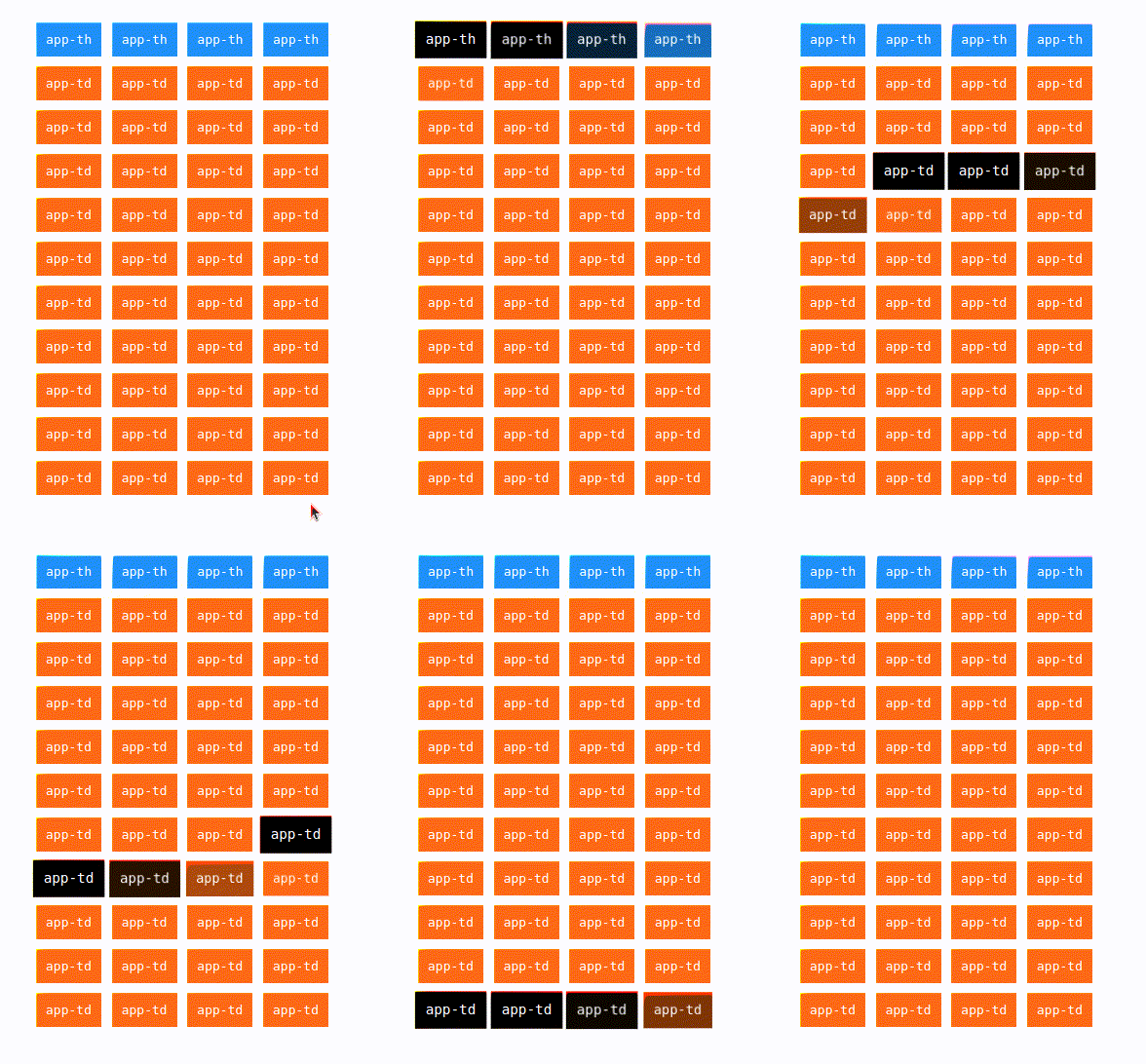
In the example, Angular executes detectChanges() on every component, even if we only clicked the last app-td. This means that other components are also checked.
Now, let's add changeDetection: ChangeDetectionStrategy.OnPush to all the components and observe the changes:
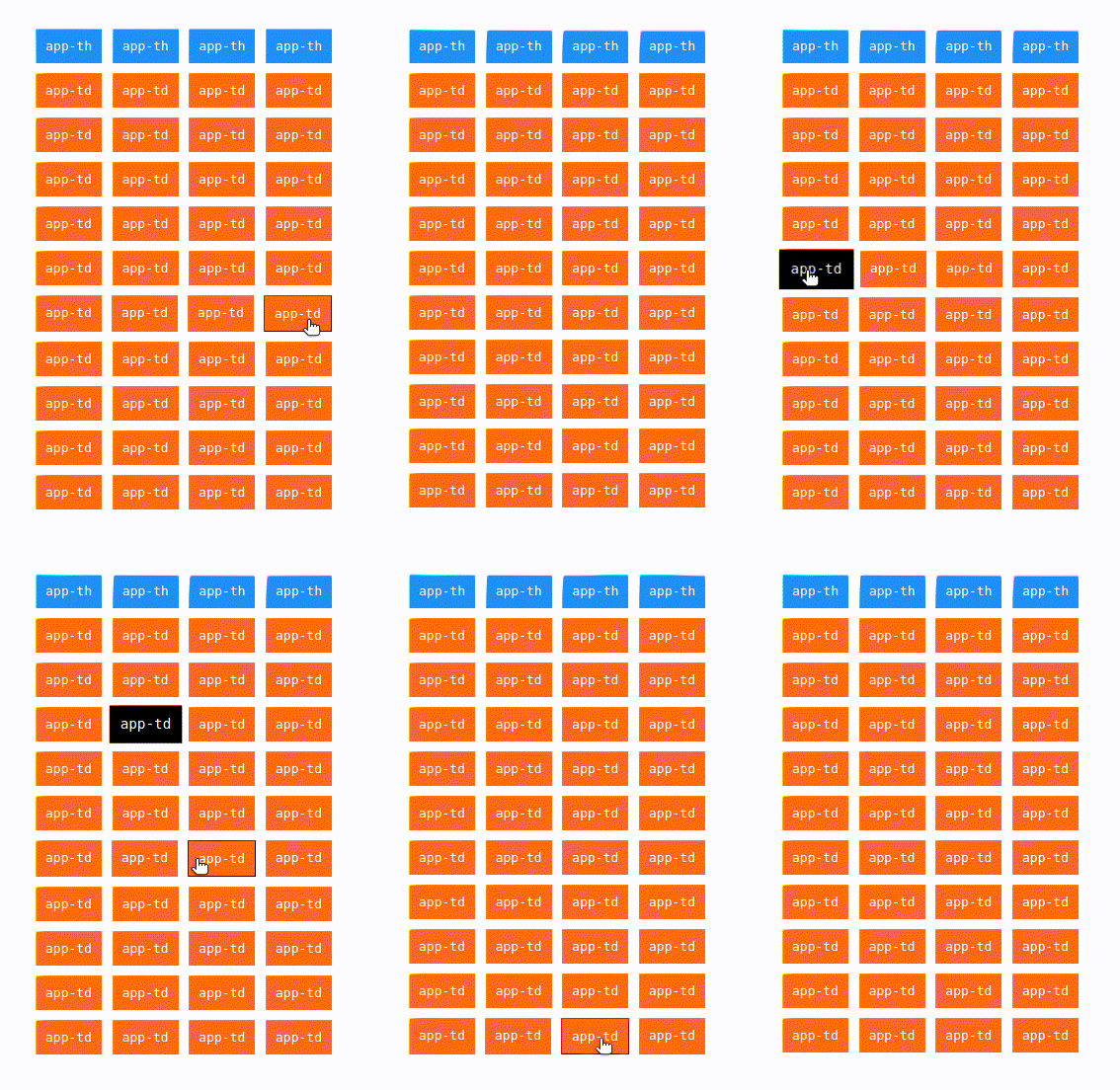
Using the one-time string initialization technique wouldn't provide significant performance benefits with a small number of calls, such as 10, 20, or even 30. However, it can be advantageous in the following scenarios:
- Reducing the amount of generated code and the number of
propertyruntime calls. - Applying it to resource-intensive components like grids, which can contain thousands of cells and rows.
# Conclusion
Keep in mind that the OnPush change detection strategy effectively reduces the amount of executed JavaScript. It is recommended to mark all your components with the OnPush strategy.
💡 Angular ESLint provides a linting rule called
prefer-on-push-component-change-detectionthat can help enforce this practice.